Navigating the Apps We Use at Between The Bumpers
Navigating the Apps We Use at Between The Bumpers
At Between The Bumpers (BTB), we utilize several apps to ensure our members have the best experience possible. Each app serves a unique purpose, from scheduling and tracking workouts to handling billing and personal training. This guide will walk you through how and when to use each app, so you can make the most of your membership.
Our Apps and How to Use Them
We use three main apps to help manage your fitness journey. Here’s a breakdown of what each one does:
1. Zenplanner
Zenplanner is our primary app for managing your membership. It handles billing, class reservations, and membership documents.
Key Features of Zenplanner:
Reserve and cancel classes.
View and sign membership documents.
Update billing information.
Viewing the group class workouts of the day.
How to Set Up Zenplanner:
Download the app:
Log in using the email and password you used when signing up at BTB.
Forgot your password? Use the “Forgot Password” link
Scheduling Policies: Reserve and Cancel Classes
Reserve a Spot
Since we cap the number of attendees in each class to ensure safety and quality, reserving your spot is a must! If a class is full and you don’t have a reservation, unfortunately, we won’t be able to let you in.
How to Reserve a Spot:
Log in to your Zenplanner account.
Select the class you’d like to attend.
Tap “Reserve.”
Done! Your spot is secured.
We recommend using a smartphone for this process whenever possible.
Download Zenplanner Here:
Cancel Your Spot
Can’t make it to class? Please cancel your reservation at least one hour before the class starts. Canceling as early as possible allows waitlisted members to snag your spot and get to the gym on time.
How to Cancel:
Open your Zenplanner account
Find the class you reserved.
Tap “Cancel.”
2. TrueCoach
TrueCoach is exclusively for personal training or rehab members.
Key Features of TrueCoach:
View your personalized training plans.
Access your rehab program.
How to Set Up TrueCoach:
Download the app:
Log in using the credentials provided by your coach.
3. Jane App
Jane App is exclusively for booking therapy appointments (physical therapy, athletic therapy, physiotherapy, and massage).
Key Features of Jane App:
Booking therapy appointments
Updating billing information for therapy appointments
Filling out intake forms for therapy.
How to Set Up Jane App:
Download the app:
Book your treatment with your practitioner, update billing, and fill out intake forms.
If you forgot your password use the link attached here.
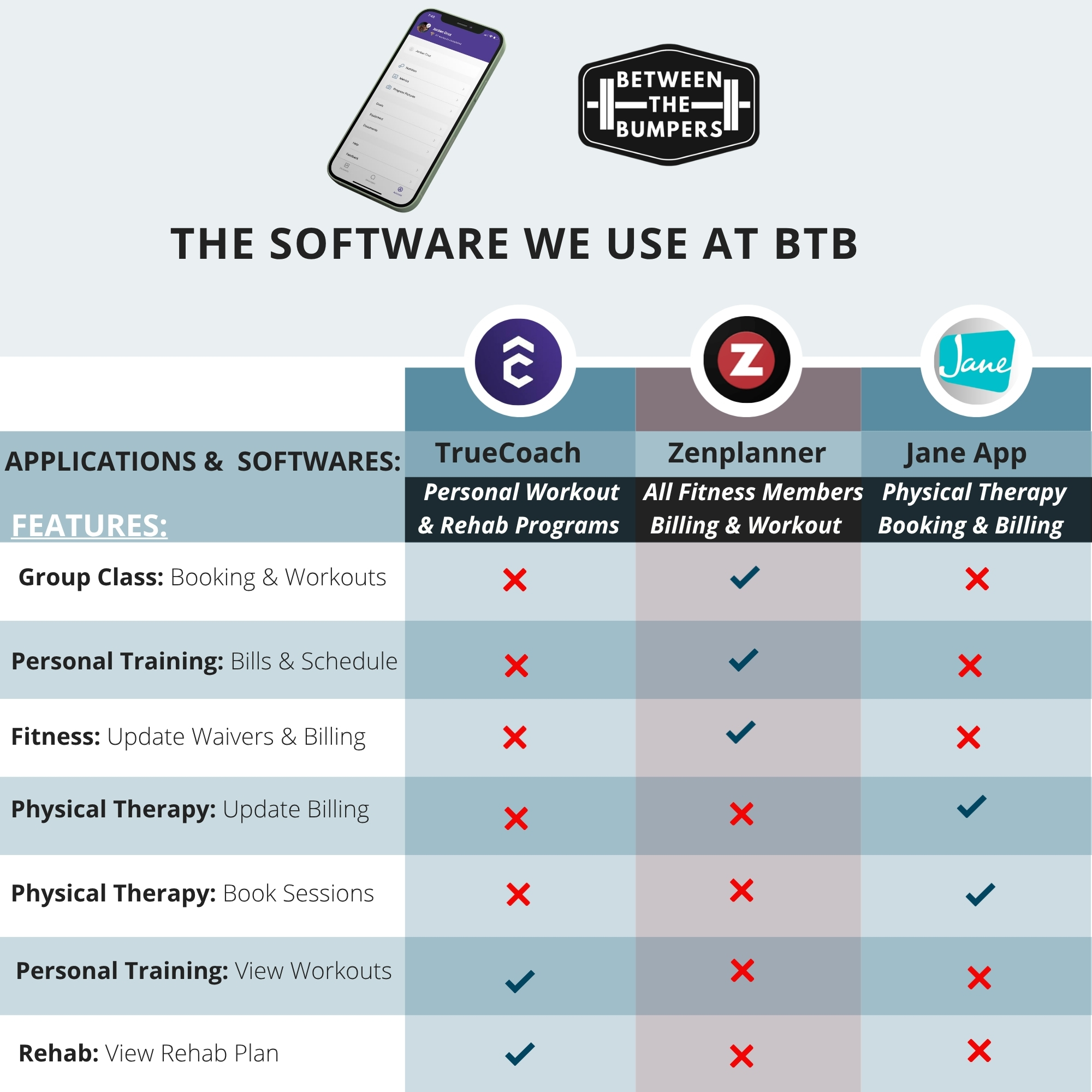
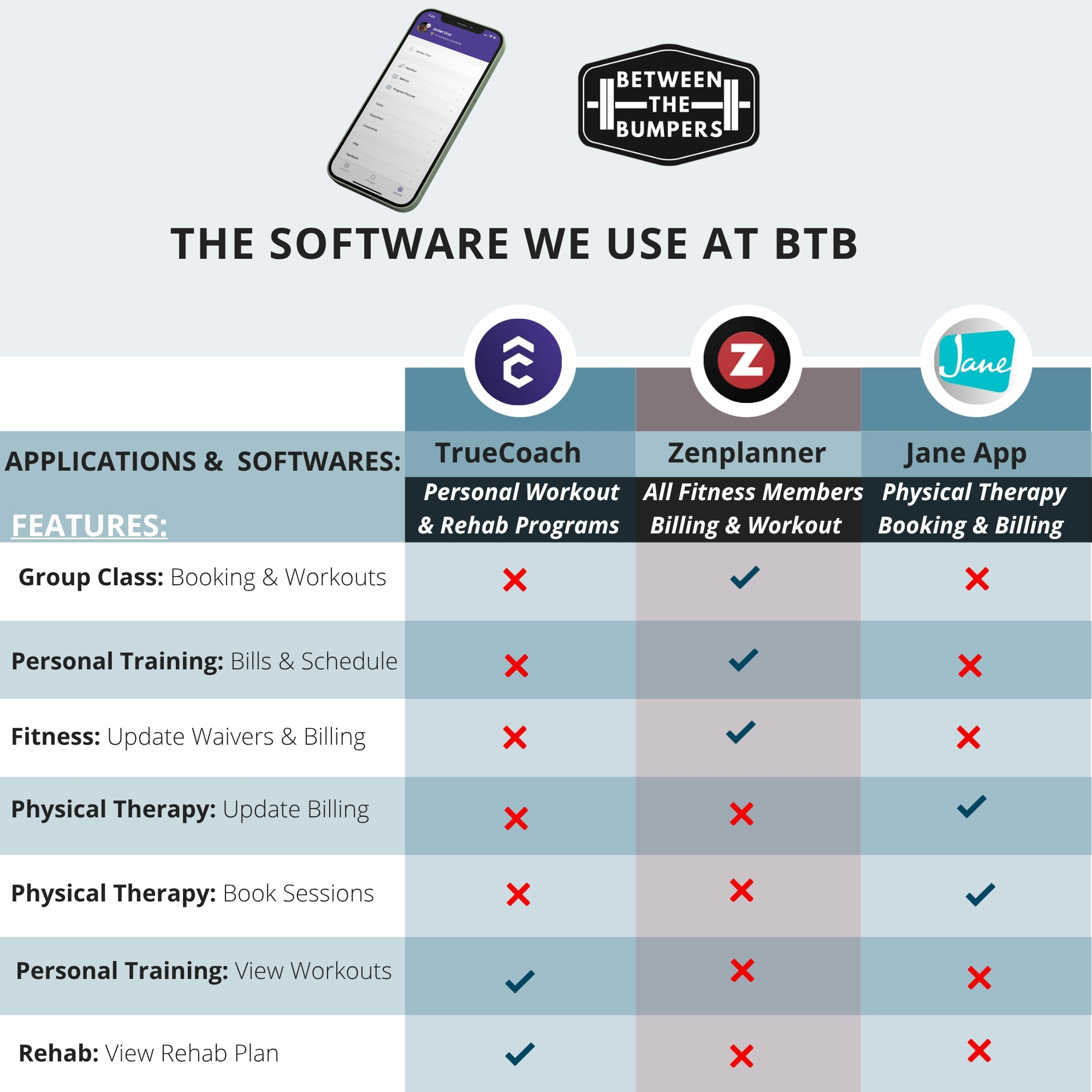
Quick Comparison: What Each App Does
Need Assistance?
If you encounter issues with any of the apps, feel free to reach out to us at [email protected], and we’ll be happy to help!
By using the right app for the right task, you’ll save time and keep everything organized. Whether you’re logging your workout in SugarWOD, reserving a class in Zenplanner, or reviewing your training plan in TrueCoach, we’re here to support you every step of the way!
